Creating a Guideline Set
Create a reusable guideline set for consistent evaluations.
Overview
A Guideline Set is the standard an Evaluation uses to score a design, prototype, page, or flow. It defines the categories and conditions your team will check so reviews stay consistent, traceable, and useful in Analytics.
Think of it as the reusable review framework behind your UX work. When the same standard is used across multiple evaluations, you can compare iterations more meaningfully instead of relying on memory, screenshots, or one-off notes.
What a Guideline Set Contains
Categories
Categories group related checks into meaningful areas such as accessibility, usability, customization, recovery, or security. They also carry the category colors used across the app, which makes conditions easier to identify during evaluations, condition review, and later handoff conversations.
Conditions
Conditions are the individual checks inside each category. During an Evaluation, each condition is answered as Pass, Fail, or NA (not applicable), and those answers roll into category and overall scores.
Understanding Guideline Sets
Before you create one, it helps to understand the basic structure:
Guideline Set
├── Category: Navigation & Structure
│   ├── Condition: Navigation labels are clear and consistent.
│   ├── Condition: Primary actions are easy to find.
│   └── Condition: The page hierarchy matches user priority.
├── Category: Visual Design
│   ├── Condition: Primary actions are visually distinct from secondary actions.
│   └── Condition: Text contrast supports comfortable reading.
└── Category: Accessibility
    ├── Condition: Interactive targets are at least 44x44px.
    └── Condition: Error messages explain how to recover.
This parent-child structure keeps the review focused. It also makes the score easier to audit later because every result can be traced back to the category and condition that produced it.
Choose a Starting Option
To create a guideline set:
- Open
Guidelines. - Click
New Guideline Set. - Choose
Start from templateorStart blank. - Enter the guideline set details.
- Click
Create.
Start from template
Start from template gives you a ready-made structure with demo categories and conditions. Use it when you want a strong starting point and plan to refine the set for your own product.
The template card may describe the starter checks as demo questions; in the workspace, those checks become conditions. You can rename categories, change colors, edit conditions, delete what does not apply, and add your own checks after the set is created.
Start blank
Start blank creates an empty Guideline Set. Use it when your team already has a rubric, design standard, accessibility checklist, or client-specific review model and wants to build from that structure directly.
Blank sets are best when the categories and conditions need to match existing language exactly.
Guideline Set Fields
When creating a guideline set, you will enter:
- Name: The title of your guideline set.
- Description: A short summary of what the set is meant to evaluate.
- Version: A version label for the guideline framework you are using.
Use the version to distinguish meaningful changes to the standard. If categories or conditions change enough to affect future scores, create a duplicate or new version instead of continuously rewriting the same set.
Keep these details short and clear. The name and version appear in places where evaluators need to recognize which standard they are using.
Manage a Guideline Set
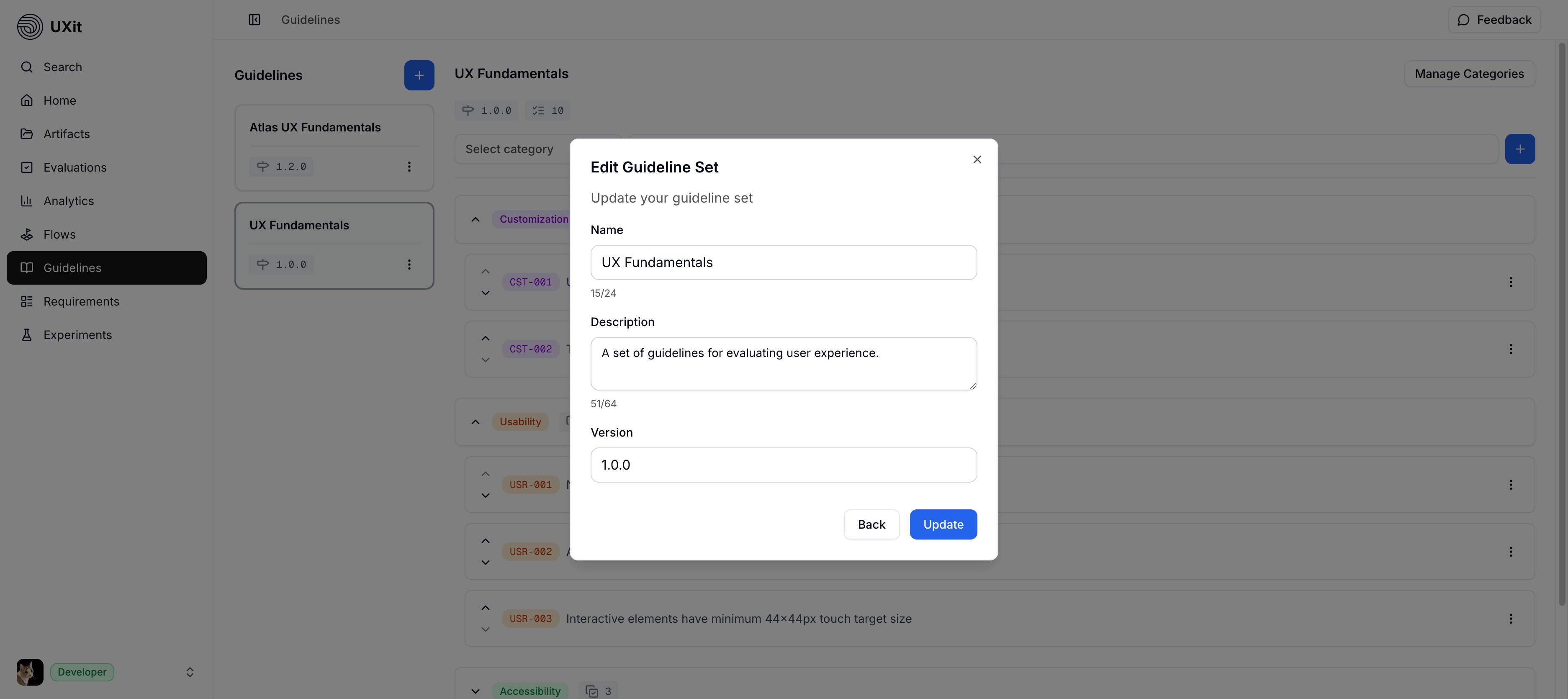
After a set exists, use the set-level Actions menu when you need to update its details or remove it.
Edit a Guideline Set
Use Edit when you need to update the set name, description, or version label. This is a normal maintenance action and does not change the categories or conditions inside the set by itself.
Version before rewriting
If a set has already been used for evaluations, update details carefully. For major changes to the standard itself, create a duplicate or new version before rewriting categories and conditions.
Delete a Guideline Set
Deleting a guideline set is permanent
Do not delete a Guideline Set just to make major edits. Duplicate or version it first if you need to preserve historical comparison.
Use Delete only when the selected set should be removed. This is a destructive action, so treat it differently from editing set details.
Draft With Muse
Muse can help draft guideline conditions directly from the Guidelines workspace. Open Muse, describe the product area, design standard, or use case you want to evaluate, then review the drafted conditions before applying them to the set.
Use Muse as a drafting assistant, not as the final owner of the standard. The team should still confirm that each condition is objective, scoped to one idea, and written in language evaluators can answer consistently.
Preserve Guideline Set Versions
Duplicate before major changes
Do not overwrite the only version of a Guideline Set if you need clean historical comparisons. A heavily edited set changes the standard future evaluations use, so later Analytics results may no longer be comparable to older runs.
Guideline Set records stay editable so teams can refine wording, fix mistakes, and improve the review structure over time. Small cleanup is expected. Major rewrites need more care because future Evaluations and Analytics depend on the conditions that existed when the work was scored.
Create a duplicate or new version before you make drastic changes, such as replacing a category, removing several conditions, combining duplicate conditions, or changing the standard the team is measuring against. If you keep editing the same set, future scores may be based on conditions that did not exist in earlier evaluations, which makes trends over time harder to trust.
Use the same Guideline Set when:
- You are fixing typos or clarifying wording without changing the meaning.
- You are making small order changes that do not affect what is being scored.
- The same conditions still represent the standard you want to measure.
Create a duplicate or new version when:
- A category is being rewritten or replaced.
- Several conditions are being added, removed, or merged.
- The team is changing what the evaluation is supposed to measure.
- You want to preserve the earlier scoring model for historical comparison.
Best Practices
- Keep categories logical and easy to scan.
- Aim for a practical sweet spot. Too few conditions can limit the value of
Analytics, while too many can make evaluations slow and harder to maintain. - Keep conditions objective, specific, and easy to evaluate consistently.
- Keep the structure stable if you want comparable results over time.
- Use
Start from templatefor speed,Start blankfor custom frameworks, andMusewhen you want help drafting a first pass.