Use Cases
Break a requirement into focused user scenarios.
Overview
A Use Case is a focused user scenario inside a requirement. It describes what a user is trying to accomplish, in what context, and why that scenario matters.
If a requirement is the feature area, the use case is one concrete way someone interacts with it.
Requirement: Pizza ordering process
├── Use Case: Browse available pizzas
├── Use Case: Customize toppings
└── Use Case: Complete checkout
Use cases are important because they keep the work centered on user goals. Instead of planning only around screens, tickets, or components, you describe the scenario a person is trying to complete.
What a Use Case Should Explain
Muse can help
If you do not want to write this from scratch, describe the scenario to Muse and let it draft the use case structure for you.
A useful use case answers the UX version of the five Ws, plus How. You do not need to write a long formal document, but the scenario should make the context clear enough that someone else can understand the user's goal.
- Who: Who is the user or role in this scenario?
- What: What is the user trying to accomplish?
- When: When does this scenario happen in the journey?
- Where: Where does it happen in the product, service, or real-world context?
- Why: Why does this scenario matter to the user?
- How: How does the user move through the scenario at a high level?
For example:
Weak use case
└── Checkout page
    └── Names a screen, but does not explain what the user is trying to do.

Better use case
└── Complete checkout
    ├── Who: Customer ordering a pizza.
    ├── What: Reviews the order and submits payment.
    ├── When: After choosing pizzas and customizing toppings.
    ├── Where: Cart and checkout flow.
    ├── Why: The customer wants to place the order without losing progress.
    └── How: Confirms order details, enters payment, and sees confirmation.
You do not need a long formal use-case document. In UXit, the title and description should be enough to orient the team, and the acceptance criteria carry the testable detail.
Where Use Cases Live
Use cases live inside Requirements. There is no separate top-level Use Cases workspace.
You can work with use cases from:
- The
Kanbantab, where use cases appear as draggable cards. - The use case drawer, where you edit overview details, criteria, and artifacts.
Add a Use Case
From Kanban, click the plus button in a column to add a use case to that status.
When creating a use case, you may enter:
Requirement: The parent requirement, when the form is opened from Kanban.Use Case: The scenario title.Description: A short explanation of the user goal or state.Card hero: An optional image for the Kanban card.Point of Contact: The person responsible for the use case.
Use cases receive an ID such as UC-001 when tracking badges are enabled.
Use Case Drawer
Beta development
Use case and acceptance criteria activity will be added to the drawer later, along with more image attachment and comment functions. UXit is still in beta and this area is actively being developed.
Click a use case card to open the drawer. The drawer is where most use case work happens after creation.
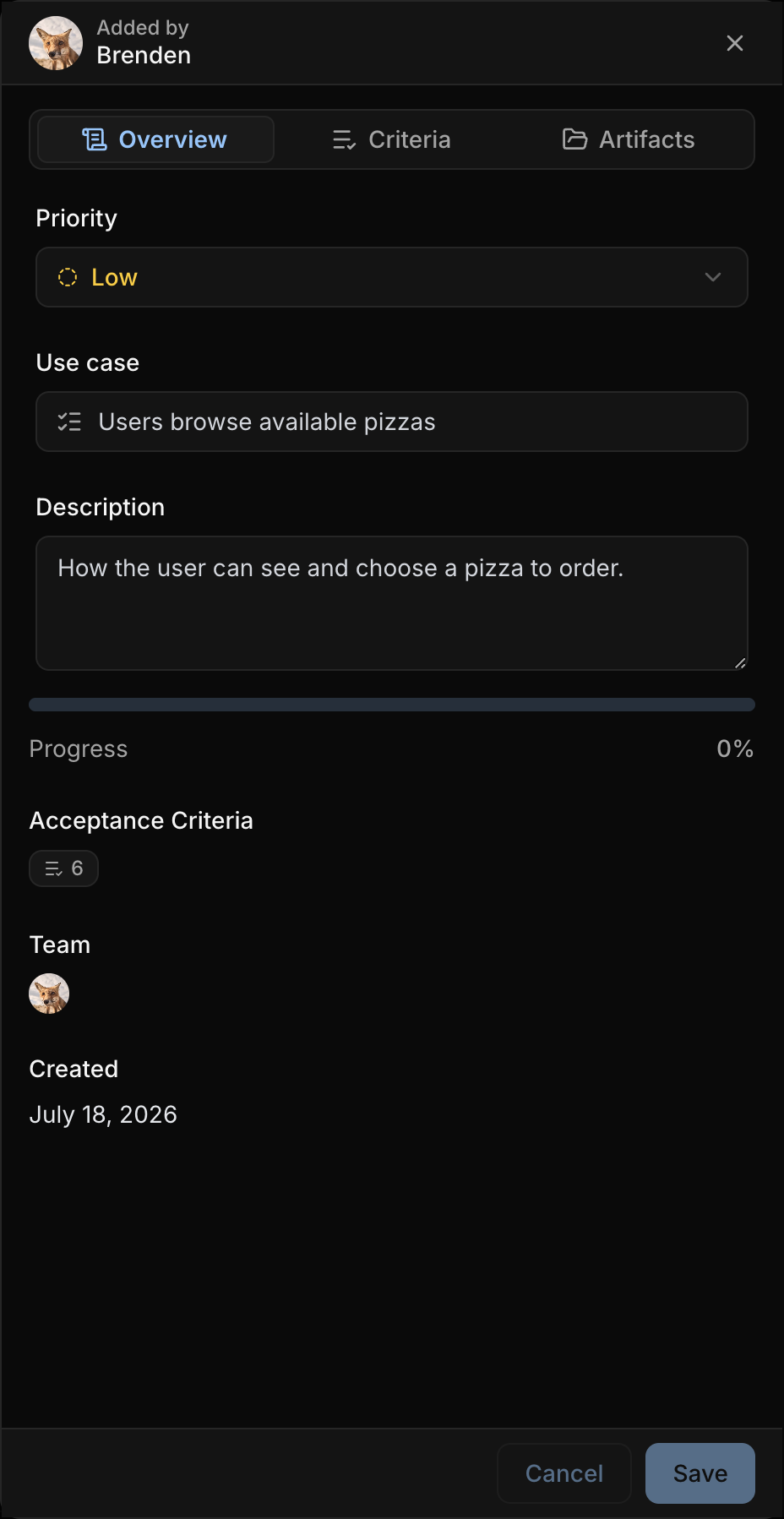
Overview
Use Overview to update the use case title, description, and priority. It also shows progress, acceptance criteria count, team, tracking link, and created date when available.
The progress bar reflects completed acceptance criteria. When criteria are marked complete in the Criteria tab, the use case card and drawer progress update to match.
Criteria
Use Criteria to add, edit, complete, delete, and reorder acceptance criteria for the selected use case.
Acceptance criteria are the testable behaviors that make the scenario concrete. Keep them close to the use case they belong to so review work stays focused.
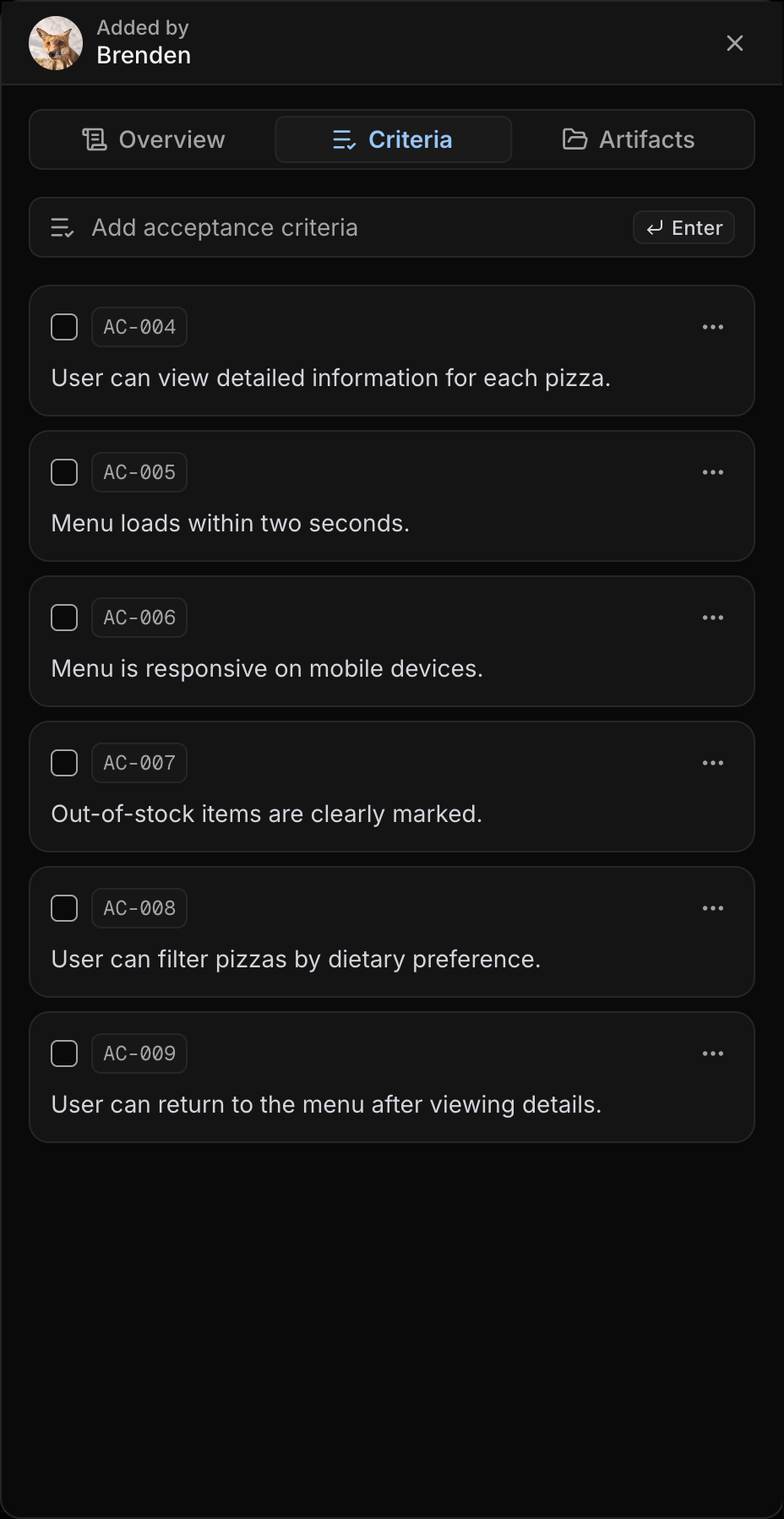
Artifacts
Use Artifacts to upload or remove the card hero image for the use case. Add an image when the use case is easier to recognize with a mockup, screen state, or visual reference.
Draft Use Cases with Muse
Muse can turn plain language into requirement drafts, use cases, and acceptance criteria. This is especially useful when you know what the product needs to do, but have not yet broken it into clean scenarios.
Use Muse to draft the structure, then review and adjust the cards before applying them.
Sharing Use Cases
Use cases can be shared from the available share actions. A use case share link gives the recipient a read-only view of that use case and its acceptance criteria.
Use this when a stakeholder needs to review one scenario without seeing the full board.
Best Practices
- Keep each use case focused on one user goal.
- Start with the primary path before documenting edge cases.
- Use clear titles such as Browse plans, Create account, or Complete checkout.
- Put supporting context in the description, not the title.
- Add acceptance criteria soon after creating the use case so the scenario becomes testable.
- Add a card hero when visual context helps someone recognize the work quickly.
- Use
Kanbanwhen you need to track use cases by status.