Acceptance Criteria
Write objective, testable behaviors for each use case.
Overview
Acceptance Criteria are the specific behaviors that must be true for a use case to be considered ready, complete, or reviewable.
If a use case says what the user is trying to accomplish, Acceptance Criteria say what the experience must support along the way.
Use Case: Complete checkout
└── Acceptance Criteria
    ├── User can review the order before payment.
    ├── User can correct payment errors without losing cart contents.
    └── User receives confirmation after checkout succeeds.
Acceptance criteria help remove ambiguity. They give designers, developers, product owners, QA, and stakeholders a shared definition of what "done" means for a scenario.
What Acceptance Criteria Should Do
Good acceptance criteria should be:
- Specific: They describe one behavior, state, or outcome.
- Observable: A reviewer can see whether the behavior exists.
- Testable: The behavior can be checked clearly.
- User-centered: The wording focuses on what the user can do, see, understand, or recover from.
They should not be vague opinions like "the page is easy to use." Instead, describe the behavior that would make the page easier to use.
Weak criterion
└── Checkout is easy.
    └── Too subjective. A reviewer cannot clearly test "easy."

Better criterion
└── User can see the order total before submitting payment.
    └── Specific, observable, and testable.
Add Acceptance Criteria
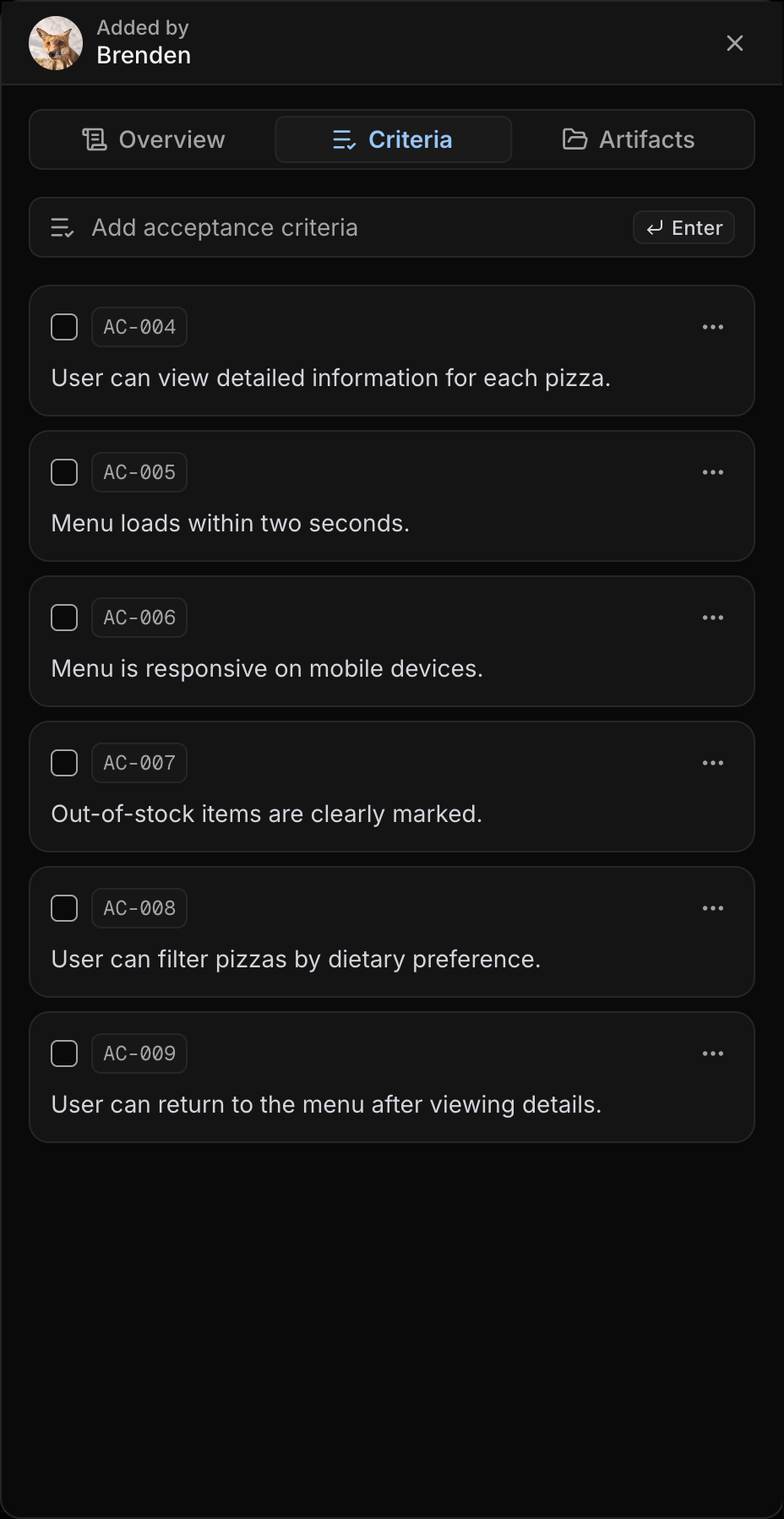
Acceptance Criteria are managed from the use case drawer.
To add one:
- Open
Requirements. - Select
Kanban. - Click a
Use Casecard. - Open the
Criteriatab in the drawer. - Type into add
Acceptance Criteria. - Press
Enter.
Each acceptance criterion receives an ID such as AC-001 when tracking badges are enabled.
Complete, Edit, Delete, and Reorder
From the Criteria tab, you can manage each criterion without leaving the drawer.
Complete
Click the checkbox beside a criterion to mark it complete or incomplete.
Completion updates the progress for that use case. The progress bar in the drawer and the percentage on the Kanban card reflect how many acceptance criteria are complete.
Edit
Open the criterion Actions menu and choose Edit to update the wording. Use this when the requirement is still being refined or the design has changed.
Delete
Open the criterion Actions menu and choose Delete to remove a criterion that no longer belongs in the use case.
Cannot be recovered
Deleted acceptance criteria cannot be recovered. Edit or reorder a criterion when you still need to keep the underlying requirement detail.
Reorder
Drag criteria within the list to change their order. UXit saves the new order after the drop.
Use ordering to match the user's flow through the experience, group related criteria, or place the most important checks first.
Criteria and Guidelines
Acceptance criteria and guidelines answer different questions:
Acceptance Criteria = what behavior should exist
Guidelines          = how that behavior is evaluated
For example:
Acceptance Criterion:
User can correct payment errors without losing cart contents.

Guideline Conditions:
- Error messages are visible and specific.
- Form state is preserved after validation fails.
- Recovery paths are accessible by keyboard.
Not scored directly
Acceptance criteria define behaviors to validate. They are not scored directly in Analytics. Evaluation scores come from guideline conditions answered as Pass, Fail, or N/A.
Write Better Criteria
Use direct, observable wording. A strong criterion should describe what a person can do, what the system shows, or what state must be preserved.
Good criteria
├── User can view available pizzas before choosing one.
├── User can filter pizzas by dietary preference.
├── User can remove a topping before checkout.
├── User sees a confirmation message after payment succeeds.
└── System preserves cart contents after a failed payment attempt.
Better criteria usually include a clear trigger, behavior, and outcome:
Trigger + behavior + outcome
├── When payment fails
│   └── User sees the failed field, an explanation, and a way to try again.
├── When a pizza is out of stock
│   └── Menu shows it as unavailable before the user adds it to cart.
├── When the user changes toppings
│   └── Order summary updates before checkout.
├── When the user submits the adoption form
│   └── Required missing fields are identified inline.
└── When a client filters the dashboard
    └── Results and visible chart totals update together.
Avoid criteria that combine too many ideas or rely on subjective judgment:
Weak criterion
└── User can browse, filter, sort, favorite, customize, and checkout pizzas quickly.
    └── Too many behaviors in one criterion.

Better criteria
├── User can filter pizzas by dietary preference.
├── User can add a pizza to the cart from the menu.
└── User can edit toppings before checkout.
Weak criterion
└── The dashboard feels professional.
└── Too subjective to validate.
Better criteria
├── Client can export a filtered report with the selected date range shown in the file.
├── Client can see when dashboard data was last updated.
└── Client can reset filters without losing access to the report.Best Practices
- Start each criterion with practical language such as user can, user sees, or system shows.
- Keep each criterion focused on one behavior.
- Write criteria before evaluation so reviewers know what behavior they are validating.
- Reorder criteria to match the user's flow through the scenario.
- Use guidelines later to evaluate quality, accessibility, and consistency.